Help Center
Understanding Post on Aaja.in
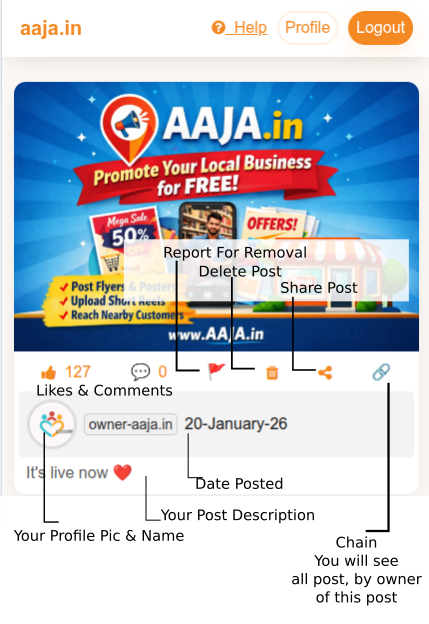
How to create an account on Aaja.in
- Choose a username:
This name is displayed publicly across Aaja.in.
- Enter your email address:
Used only for login and verification. It is never shown publicly.
- Create a password:
Always create a new password. All passwords are securely stored in encrypted (hashed) form.
- Upload a profile picture:
Your profile picture is displayed with your posts and activities.
- Complete CAPTCHA verification:
CAPTCHA helps protect Aaja.in from automated registrations.
- Email OTP verification:
Enter the OTP sent to your email to activate your Aaja.in account.
- Upload from gallery:
Select an existing image or video from your device gallery.
- Upload image using smartphone camera:
Capture a photo instantly and upload it directly.
- Upload video using smartphone camera:
Record a video and post it without saving separately.
- Best practice:
Clear and original media improves visibility and engagement.
How to update your profile and profile picture on Aaja.in
- Access your profile:
After login, click on the profile button at the top of the page.
- Update profile information:
Add or edit your profile description anytime.
- Change profile picture:
Upload a new image to refresh your profile appearance.
How to change or reset your password on Aaja.in
- Change password (logged in):
Go to Profile → Change Password and update securely.
- Forgot password:
Use the Forgot Password option on the login page to reset your password safely.
- Security tip:
Never share your password with anyone.
Contact if you still have any trouble